
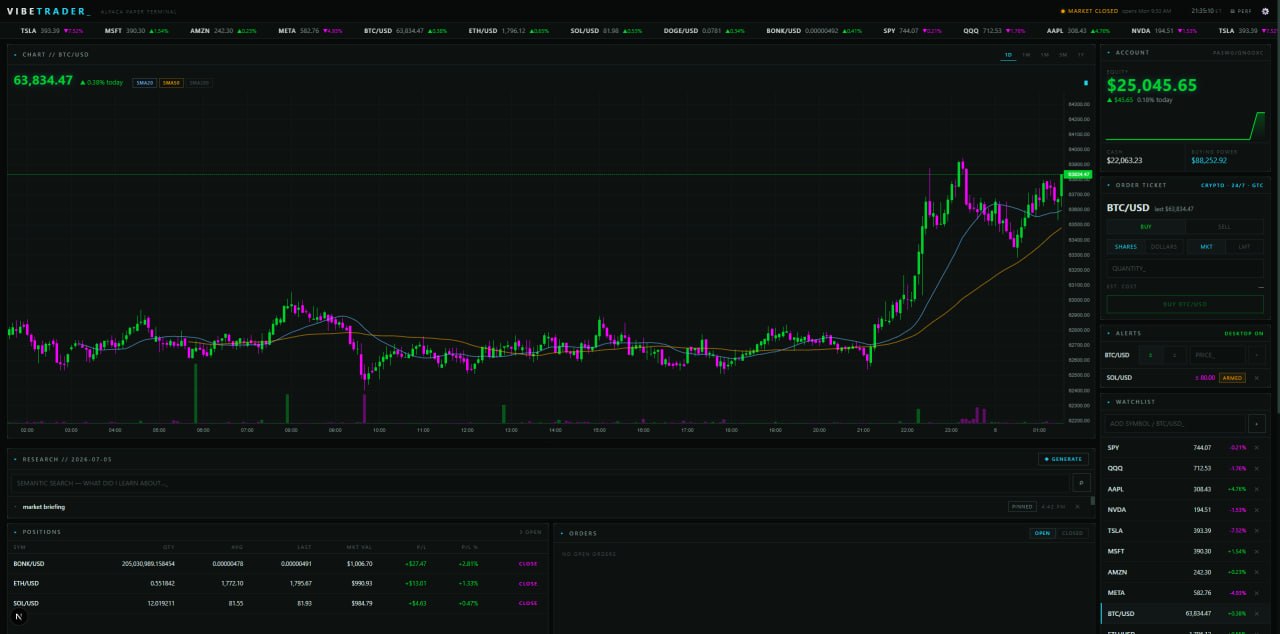
VIBETRADER is a free, open source paper trading terminal for Alpaca. It runs on your own machine, connects to Alpaca’s paper environment, and gives you a dark, terminal-style cockpit: live candlestick charts, streaming quotes, price alerts, a trade journal, an AI-triaged news feed, and a research copilot that can run on a local model.
The repo is public: github.com/Poseyv12/vibetrader
It’s also a vibe coding artifact — the core was built in one long day with Claude Fable 5 doing most of the typing, then extended one pull request at a time. That makes it two things at once: a usable trading terminal, and a real-world reference codebase for what AI-assisted development produces when it has structure behind it.
One disclaimer before anything else: VIBETRADER is paper trading only. Fake money, real market data. It’s not financial advice, and it’s not a trading bot. That boundary shaped the whole architecture, and this post covers exactly where the line sits.
What VIBETRADER Actually Does
- live candlestick charts with SMA overlays, click-to-set price alerts, and a streaming ticker tape
- market, limit, and bracket orders for stocks and crypto, with a margin-aware order ticket that shows buying power and warns you before you do something Alpaca will reject
- account, positions, orders, and performance dashboards
- a tabbed panel under the chart that switches between a research journal and a live news feed for whatever ticker you have selected
- an AI copilot that can pull quotes, technicals, news, and your positions to write research notes — through a local model in LM Studio, or OpenAI or Anthropic if you’d rather use a frontier model
- a news watchdog that AI-triages headlines touching your watchlist and toasts you when something looks high-impact
- a theme editor, because a terminal this green deserved colorway options
How It Works
The stack is deliberately boring: Next.js App Router, React, TypeScript, and lightweight-charts for the candles. The server holds one websocket per Alpaca stream (the free tier only allows one data connection) and fans updates out to the browser over Server-Sent Events. LM Studio provides the local model layer, with OpenAI and Anthropic as switchable alternatives.
Everything sensitive stays server-side. The browser never sees Alpaca keys, and runtime state lives in local JSON files — no database to stand up, nothing leaves your machine. That was one of the first rules written down for the project, and it held for the whole build.
The order ticket is margin-aware because Alpaca margin is automatic at the account level: a leverage readout in the account panel, buying-power display and quick-size buttons, and graduated warnings — amber when you’re borrowing, amber when a position is too big to hold overnight, red when the order would bounce. It even encodes the fine print, like crypto and fractional orders being cash-only.
The AI Copilot (and the Line It Can’t Cross)
VIBETRADER has its own AI layer, separate from the AI that built it, and it has one hard rule: the copilot’s tools are read-only. It can see your account, positions, orders, quotes, technicals, and news. It can’t place, modify, or cancel anything. If you ask it to trade, it points you at the order ticket.
There’s a second rule that matters just as much for anyone building with small local models: for broad tasks like daily briefings and news triage, the server gathers all the data in normal deterministic code first, and the model only writes the summary. Math happens in TypeScript, never in the model. Small local models will confidently invent an RSI if you let them, so they don’t get the chance.
Could the app place trades some day? Maybe. But live trading would be its own milestone with its own safety work, not a toggle. The research layer and the execution path stay separated on purpose, even in paper mode. If you’re building anything that touches money or credentials, the vibe coding security risks post covers why these boundaries need to exist before the features do.
How It Was Built
The build loop was simple: describe a feature in plain English, let Claude explore the codebase and implement, review the diff, test against the real (paper) API, then ship it as a PR. When something surprised us, the lesson went into a rules file so the next session started smarter. (The general patterns behind that loop are collected in vibe coding prompts that work.)
A few moments from the build say more than the abstract version:
The margin feature started as one sentence. The prompt was lets add leverage trading because alpaca paper lets you use 4x leverage i believe. Instead of guessing, Claude called the paper account’s API first and came back with facts: a 4x intraday multiplier, a smaller overnight limit under Reg-T rules, and the detail that margin is automatic at the account level — so leveraged orders already worked and the app just needed to become margin-aware. One plain sentence in, one feature out that I understood better after the build than before it.
The AI pushed back on a design. The original ask was to make the chart area toggle between the chart and a news stream, with an invitation to propose something better. Claude’s argument: in a trading terminal the chart should never disappear, and the resizable strip under the chart already had a drag handle — so make that strip tabbed instead. RESEARCH | NEWS, chart always visible. It was right, and it’s a better design than the one requested.
A real bug took one sentence to fix. Dragging the chart’s price axis and then switching tickers left the chart stuck at the old price range. One sentence of description, and Claude explained the cause (manual price-scale mode never reset on symbol change) and fixed it in three lines. That’s a very different experience from debugging AI-generated code with no context to lean on.
The glue holding all of this together is an AGENTS.md file that every AI session reads before touching code: the architecture in one pass, the safety boundaries, and a growing list of gotchas — Alpaca charges crypto fees in the base asset, closing a position by symbol deletes the entire position, bracket orders are equities-only, Turbopack’s file watcher on Windows sometimes misses edits. Every line exists because something surprised us once. If you want the same setup, start with our AGENTS.md template, and read Claude.md vs Agents.md vs Cursor rules if you’re not sure which file your tools actually read.
And to be clear about the human’s job in all this: every diff got read, every feature got tested against the real API before merging. Claude generates code fast, which also means it can generate wrong code fast. Reviewing isn’t optional; it’s the job.
Getting Started
Everything runs locally:
- Clone the repo: github.com/Poseyv12/vibetrader
- Add your Alpaca paper trading keys (free to create — no real money involved)
- Optionally point the copilot at LM Studio for a local model, or drop in an OpenAI or Anthropic key for a frontier one
The README covers the details. You get real market data against a fake account, which makes it a safe place to learn how trading APIs, streaming data, and order types actually behave.
What’s Next
The open source release is a starting point, not a finish line:
- cleaner onboarding and setup docs for Alpaca keys and LM Studio
- a demo mode so people can poke around before connecting anything
- better performance reporting and research journal search
- more chart and alert customization
- real tests around the order forms and API helpers
And maybe, eventually, live trading — opt-in, human-confirmed, and heavily tested, after the paper workflow has proven itself. The app should get better at research, journaling, and review. It shouldn’t quietly become a machine that makes financial decisions on its own.
Should You Try It?
If you want to learn how trading APIs work without risking money, VIBETRADER is a low-stakes way to do it. If you’re learning AI-assisted development, it’s something rarer: a complete, working codebase you can read PR by PR to see how an app like this actually comes together — credentials handling, streaming state, safety boundaries and all.
Build real things. Use AI where it helps. Keep your hands on the wheel. Open source it so the lessons are checkable.
FAQ
Is VIBETRADER for real-money trading?
No. It runs against Alpaca’s paper environment — real market data, fake money. It’s built for learning and research workflows, not unattended trading. Live trading might come later as an opt-in feature with much stronger safeguards.
Did Claude Fable 5 build the whole app automatically?
No. Claude wrote most of the code, but every feature was described by a human, every diff reviewed, every change tested against the real API, and the architecture calls were human decisions. The AI moved fast because the project had rules.
Why LM Studio inside the app?
It gives the research copilot a local-first option: an OpenAI-compatible server running on your own machine, no API bill, no data leaving your box. The app can also switch to OpenAI or Anthropic from the settings page if you want a frontier model doing the research.
Can the AI copilot place trades?
No. Its tools are read-only by design — account, positions, quotes, technicals, and news. Order placement, modification, and cancellation are human-only actions through the order ticket.
What makes this a good vibe coding project?
It has real teeth: API credentials, streaming data, chart state, order rules, an AI safety boundary. Every one of those forces actual decisions, which is exactly what tutorial apps don’t do. If you’re hunting for a project with the same properties, browse our vibe coding project ideas.
Where can I see the code?
Right here: github.com/Poseyv12/vibetrader


